How do Microsoft Planner, Atlassian Jira, and the Microsoft 365 PPM solution Altus differ, and how can Altus close the gap between Jira and Planner for organization-wide project and portfolio management? Below is an overview of the different capabilities of each product and of how they work together, including their suitability as a replacement for Project Online.
In brief
- Planner Basic suits simple team task lists and boards and is included in the common Microsoft 365 plans; it offers no dependency-based scheduling.
- Planner Premium adds dependency-based scheduling, custom fields and effort per person — each within a single plan, without cross-project resource and portfolio management.
- Jira Standard and Premium are strong in task and team management; Jira Premium additionally models dependencies between projects with Plans, but does not evaluate initiatives by cost and strategic goals.
- Altus PPM is the only one of the five solutions that covers the path from idea through resource requests to portfolio scenario planning, with data stored in Microsoft 365 and Dataverse.
- AI is no longer a premium feature: with a Microsoft 365 Copilot license, Planner Agent also works in basic plans.
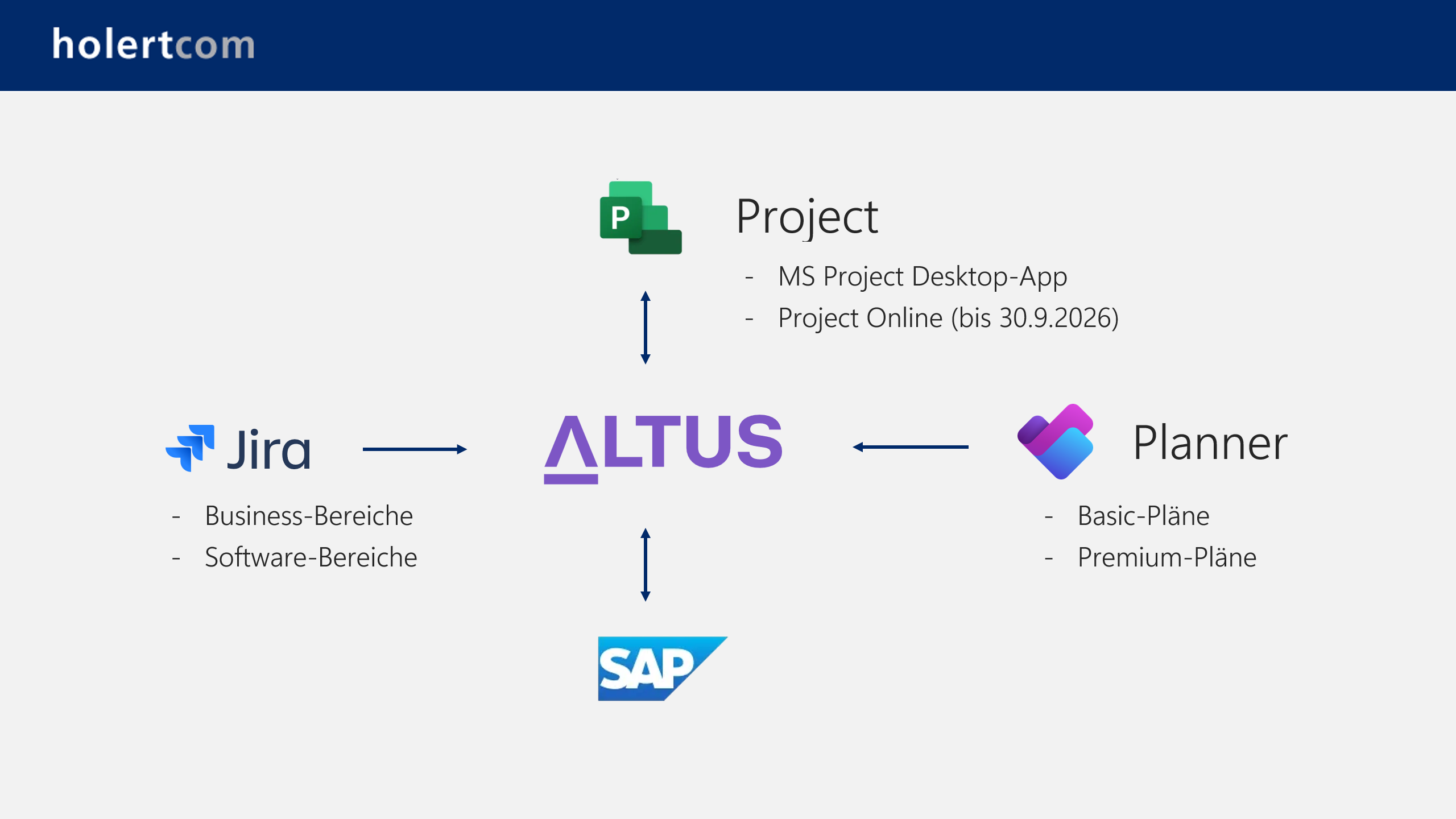
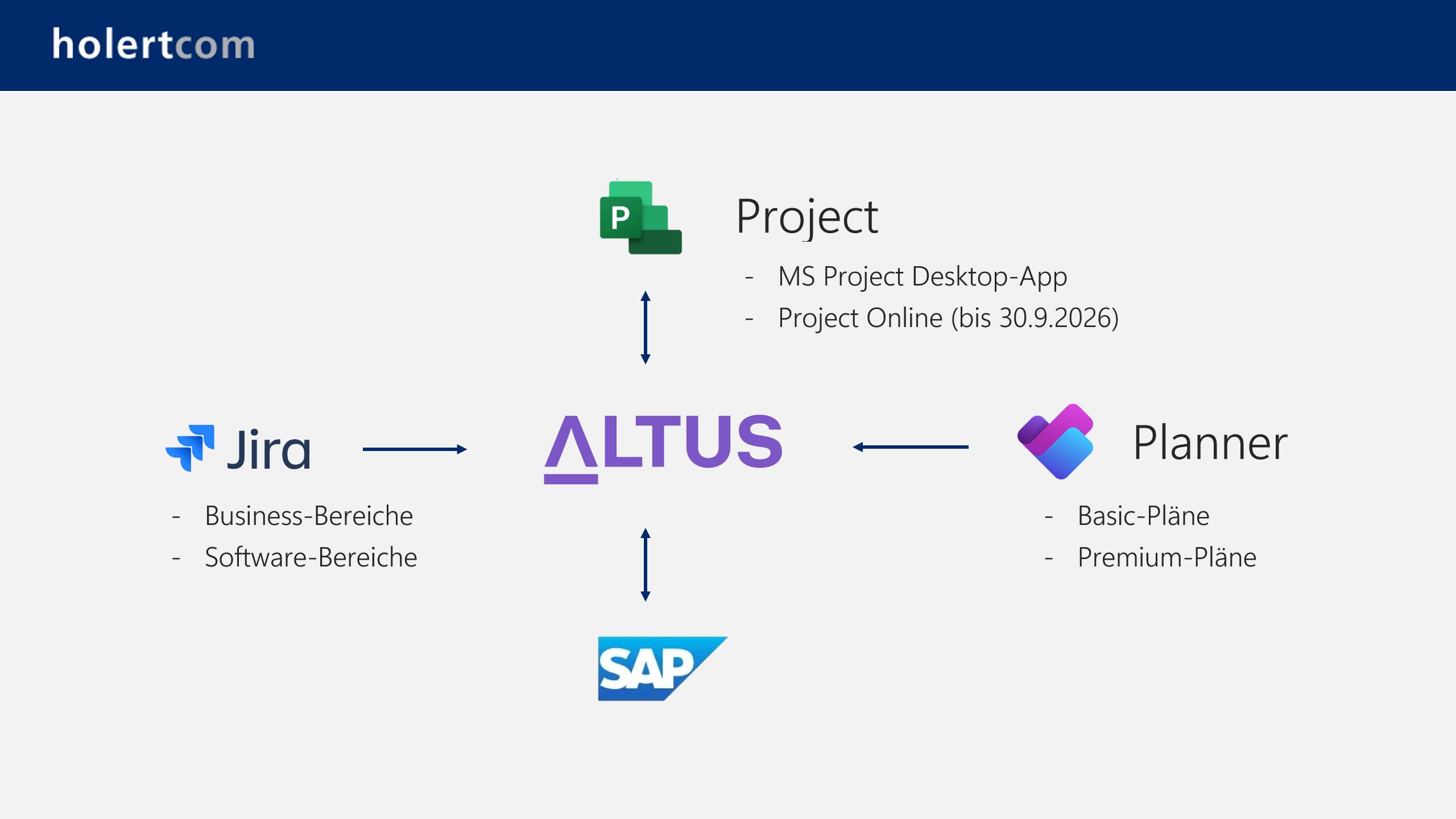
How do Jira, Planner, and Altus PPM work together?
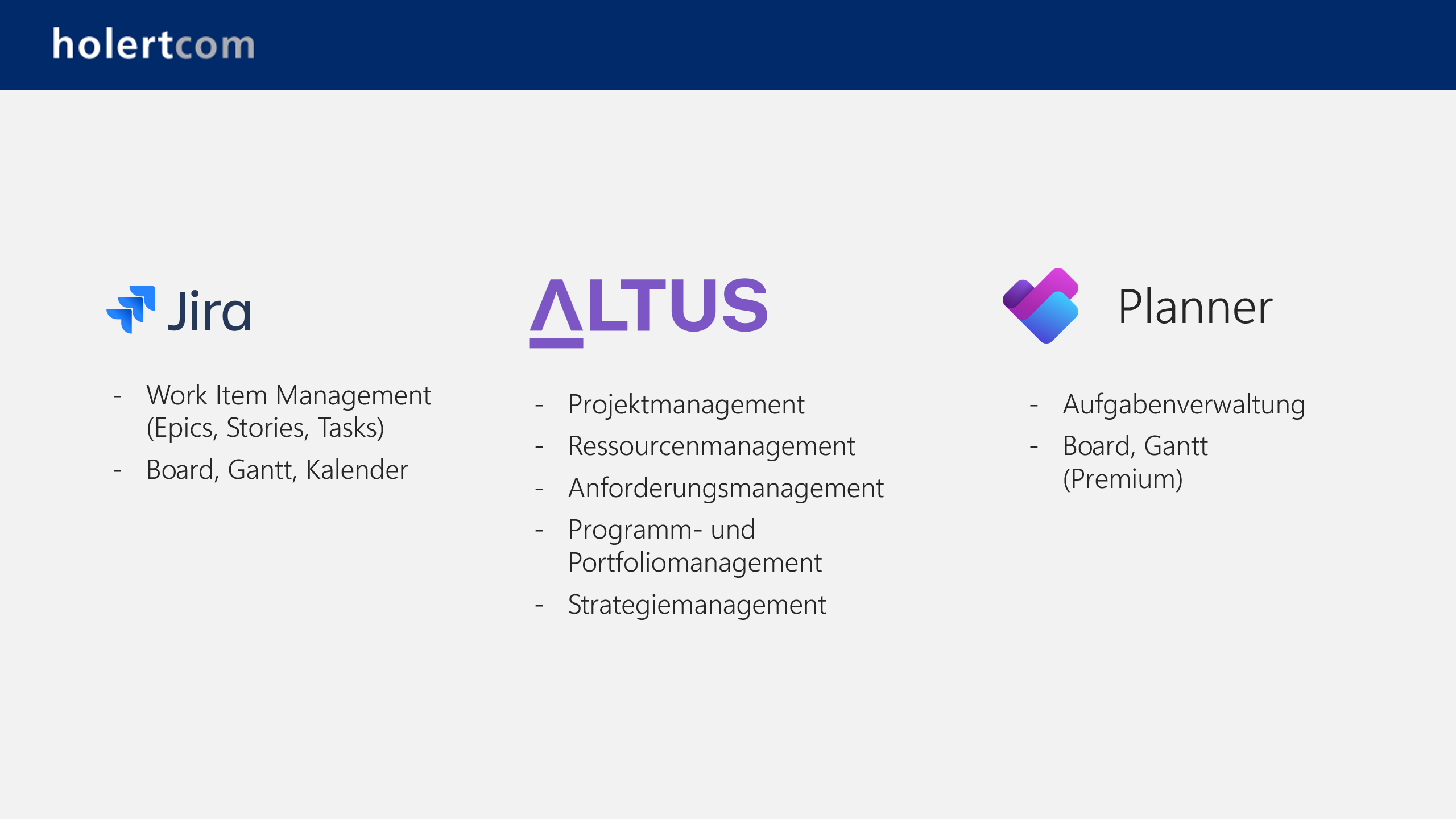
What range of features do Jira, Planner, and Altus PPM offer?
How do Planner Basic, Premium, Jira Standard, Premium, and Microsoft PPM Altus differ?
| Business process |
Planner Basic |
Planner Premium |
Jira Standard |
Jira Premium |
Altus PPM |
| |
|
|
|
|
|
| Idea and requirements management |
|
|
|
|
|
| Capturing challenges and ideas |
❌ |
❌ |
❌ |
❌ |
✅ |
| Capturing requirements incl. resource and financial needs |
❌ |
❌ |
❌ |
❌ |
✅ |
| Evaluating requirements against strategic goals |
❌ |
❌ |
❌ |
❌ |
✅ |
| |
|
|
|
|
|
| Project management |
|
|
|
|
|
| Task planning in a list |
✅ |
✅ |
✅ |
✅ |
✅ |
| Planning on a Kanban board |
✅ |
✅ |
✅ |
✅ |
✅ |
| Graphical scheduling based on dependencies |
❌ |
✅ |
❌ |
❌ |
✅ |
| Graphical baseline comparison |
❌ |
❌ |
❌ |
❌ |
✅ |
| Custom fields per project |
❌ |
✅ |
✅ |
✅ |
✅ |
| Cross-project custom fields |
❌ |
❌ |
✅ |
✅ |
✅ |
| |
|
|
|
|
|
| Resource management |
|
|
|
|
|
| Effort estimation at task level with named resources, e.g. with people |
❌ |
✅ |
❌ |
✅ |
✅ |
| Effort estimation with generic resources, e.g. with departments |
❌ |
❌ |
❌ |
❌ |
✅ |
| Effort estimation at project level by period, e.g. by month |
❌ |
❌ |
❌ |
✅ |
✅ |
| Display of cross-project resource conflicts |
❌ |
❌ |
❌ |
❌ |
✅ |
| Submitting resource requests to team leads |
❌ |
❌ |
❌ |
❌ |
✅ |
| Fulfilling requests by team leads/resource managers with people |
❌ |
❌ |
❌ |
❌ |
✅ |
| Heatmap for resource utilization |
❌ |
❌ |
❌ |
❌ |
✅ |
| |
|
|
|
|
|
| Program and portfolio management |
|
|
|
|
|
| Standalone program and portfolio planning |
❌ |
❌ |
❌ |
❌ |
✅ |
| Managing dependencies between projects |
❌ |
❌ |
❌ |
✅ |
✅ |
| Scenario planning by costs and resources as well as strategic goals |
❌ |
❌ |
❌ |
❌ |
✅ |
| |
|
|
|
|
|
| Permission model and licensing |
|
|
|
|
|
| Role-based permission model by project and organizational unit |
❌ |
❌ |
✅ |
✅ |
✅ |
| Permission control down to field level |
❌ |
❌ |
❌ |
❌ |
✅ |
| Read access for external users to list or board possible without a license |
✅ |
✅ |
❌ |
❌ |
❌ |
| Read access for external users to the schedule possible without a license |
❌ |
❌ |
❌ |
❌ |
❌ |
| Read access for external users to the schedule possible with a license |
❌ |
✅ |
❌ |
❌ |
✅ |
| |
|
|
|
|
|
| IT security and integrations |
|
|
|
|
|
| Data storage in Microsoft 365 incl. M365 governance features |
✅ |
✅ |
❌ |
❌ |
✅ |
| Use of standard integrations, incl. for Jira and SAP |
✅ |
✅ |
❌ |
❌ |
✅ |
| |
|
|
|
|
|
| Automation and AI |
|
|
|
|
|
| Integration with Power Automate |
✅ |
✅ |
✅ |
✅ |
✅ |
| Use with Copilot |
✅ |
✅ |
✅ |
✅ |
✅ |
| |
|
|
|
|
|
| Reporting |
|
|
|
|
|
| Built-in reports and charts |
✅ |
✅ |
✅ |
✅ |
✅ |
| Built-in Power BI reports for project, program, portfolio, resource, and strategy management |
❌ |
✅ |
❌ |
❌ |
✅ |
The article Microsoft Planner Premium plans describes the features, license plans and prices of the premium plans in detail.
Frequently asked questions about this comparison
Which of the five tools is suitable as a replacement for Microsoft Project Online?
For scheduling individual projects, Planner Premium comes closest to Project Online. As soon as cross-project resource management, requirements evaluation and portfolio governance are needed, Altus PPM is the more suitable successor. For details, see Microsoft Project Online ends on 30 September 2026 – alternatives.
Do I need a premium plan to use Copilot in Microsoft Planner?
No. Planner Agent is available in all basic and premium plans that are shared with a Microsoft 365 Group. It requires a Microsoft 365 Copilot license; generating tasks from goals remains limited to premium plans.
Can Jira Premium model dependencies between projects?
Yes. With Plans, Jira Premium brings work items from several spaces into one timeline and shows dependencies derived from work item links. Resource requests to team leads, utilization heatmaps and an evaluation by cost and strategic goals are not part of Jira.
How do Jira, Planner and Altus PPM work together?
Teams keep planning their tasks in Jira or Planner. Altus PPM adds the layer for requirements, resources and portfolio on top and connects Jira and SAP through standard integrations.
Can external participants get read access without a license?
In Planner Basic and Premium, yes, for list and board through guest access to the Microsoft 365 Group. Viewing the schedule requires a license in Planner Premium and Altus PPM; Jira counts every participant as a licensed user.
How Holert supports your tool selection
A feature table shows what a tool can do — not which combination fits your organisation. In practice the questions beside it decide: which licenses you already own, where team planning in Jira or Planner ends and portfolio governance begins, and how resource and financial data come together.
Holert guides that selection as a vendor-neutral consulting and implementation partner with more than 25 years of experience in project, programme and portfolio management on Microsoft and Atlassian — methodically along PMI and SAFe, technically from Microsoft Planner and Project through Jira to Altus PPM and Projectum xPM. Companies such as Rohde & Schwarz, KUKA and LAPP rely on our support. Our fixed-price PPM software selection provides a defined framework for it, and our customer references give an overview of past projects.
 Renke Holert

 Renke Holert : Jun 7, 2026, 11:47:25 AM