Jira is the central tool for many teams when it comes to managing software and IT projects. But over time, the same patterns keep emerging: the backlog grows, tickets sit untouched – and no one can quite explain why. The boards are full, but actual progress? Barely visible. Meetings are based on assumptions. And transparency? Nowhere to be found.
TL;DR
- Process mining reads the change history of Jira work items and shows how work actually moves through the statuses – not how it is supposed to.
- Power Automate Process Mining requires three mandatory fields per event: Case ID (issue key), Activity Name (target status) and a timestamp.
- Dataverse cannot be connected directly – the connection runs through the OData connector on
api/data/v9.2.
- For bulk extraction from Jira Cloud, since late August 2026: fetch change histories through the Bulk fetch changelogs endpoint, not through
expand=changelog.
- Capacity: each Power Automate Premium license contributes 50 MB to a tenant-wide pool (capped at 100 GB); the Process Mining add-on adds another 100 GB.
When Jira Boards Are Full but Progress Stalls
We know this situation all too well – and we wanted to find out: is it really about team performance? Or could hidden process gaps be the cause?
The answer was closer than expected – and it could be made visible in just a few clicks by applying Power Automate Process Mining to Jira data.
When the To-Do List Tells Only Half the Truth
No doubt about it: Jira is powerful. But as the number of tickets and interactions grows, so does the number of blind spots:
-
Issues linger in the backlog for a long time without a clear next step.
-
Status changes happen in an unstructured way or are overlooked.
-
Manual tracking becomes an error-prone time sink.
The result: everyone is busy, but no one can see at a glance where things are really stuck. Why are stages being skipped? Why do tickets close without visible progress? And what actually happens between “In Progress” and “Done”?
From Gut Feeling to Clear Process Insights – Our Demo Setup
We no longer wanted to speculate – we wanted to understand how our processes actually run.
So we built a setup – with Power Automate Process Mining and Jira data:
-
Automated data export from Jira: status changes, timestamps, responsibilities
-
Data storage in Microsoft Dataverse
-
Visualization in the Process Mining tool – to make the actual workflows visible
Two details decide whether a setup like this holds up. First, the data model: Power Automate Process Mining requires a Case ID, an Activity Name and a timestamp for every event – in Jira, that means the issue key, the target status of the transition and the moment it occurred, all taken from the change history. Assignee, project and issue type come in as optional attributes and later carry the analysis by team or work type (data requirements in the Microsoft documentation).
Second, the connection: Power Automate Process Mining has no Dataverse connector of its own, and no Dataflow connector either. Dataverse tables are read through the OData connector by appending api/data/v9.2 to the environment URL. Anyone unaware of this will look for the connector in the picker in vain.
On the Jira side, Atlassian changed bulk extraction in late August 2026: the Bulk fetch issues endpoint now returns up to 1,000 issues per call instead of 100 – but only if fields are named explicitly and expand=changelog is not set. For the change history, which is exactly the data the event log is built from, Atlassian points to the dedicated Bulk fetch changelogs endpoint instead; it avoids the 40-entry cap per issue that expand=changelog imposes. An export still built on the old pattern silently returns incomplete histories for long-lived issues – and with them a process map that invites the wrong conclusions.
And even with test data, the first results were astonishing.
What the Process Visualization Showed Us
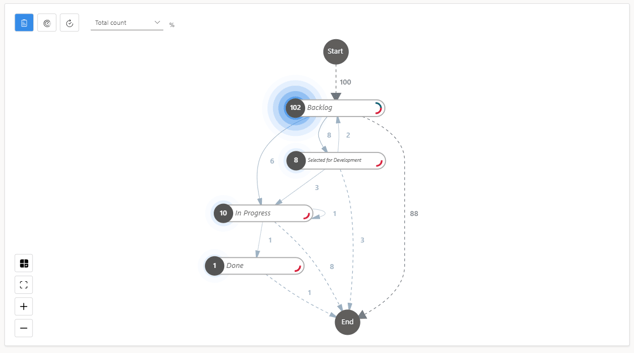
At first glance, it became clear how many weak spots hide in everyday work:
-
102 out of 112 issues got stuck in the backlog.
-
Only a single ticket reached the “Done” status.
-
Several tickets skipped active processing stages entirely – from “Backlog” straight to “Closed”.
-
Loops and waiting times were clearly visible – processes drifting back and forth without direction.
This clarity revealed how effective process mining can be at uncovering bottlenecks – even in a simulated environment.
Simple Analysis, Big Impact
Although this was carried out only in a test environment, one thing became clear: with real process insights, improvement becomes structured, measurable, and scalable.
The next step is now rolling it out in our own production environment – with the goal of accelerating our processes.
Why This Is Relevant for Other Teams, Too

Many companies that use Jira (or comparable tools) know the feeling: a lack of transparency, inconsistent workflows, and unclear bottlenecks.
Process mining shows not only what isn’t working – but where exactly to take action. With the Microsoft Power Platform, these insights can be translated directly into automated measures – without throwing existing systems overboard.
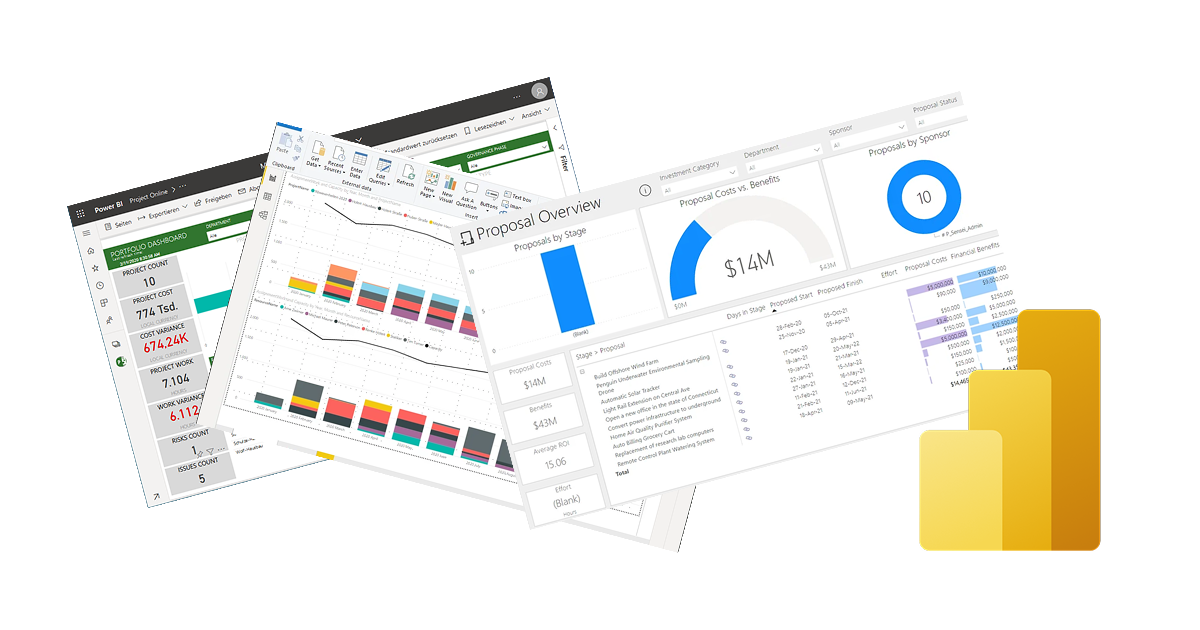
And this goes far beyond Jira: automating handovers, predicting delays with AI, visualizing the entire project portfolio with Power BI – all based on real, system-backed data. How analyses like these fit into the wider PMO picture is covered in our overview article project management with artificial intelligence from Microsoft and Atlassian in the PMO.
Frequently Asked Questions About Process Mining with Jira Data
Which Jira data does Power Automate Process Mining need?
A Case ID, an Activity Name and a timestamp for every event. In Jira, that means the issue key, the target status of the transition and the moment it occurred – all three are in the work item’s change history. Assignee, project and issue type are optional attributes.
How is the data extracted from Jira Cloud?
Through the Jira Cloud REST API. For the change history, the Bulk fetch changelogs endpoint is the one to use; expand=changelog returns only the first 40 entries per issue and is unsuitable for bulk extraction.
Can Dataverse be connected directly as a data source?
No. Power Automate Process Mining supports neither the Dataverse nor the Dataflow connector. Dataverse tables are read through the OData connector by appending api/data/v9.2 to the environment URL.
Which license does process mining require?
Process mining is part of Power Automate Premium. Each Premium license contributes 50 MB of process mining capacity to a tenant-wide pool that is capped at 100 GB. Beyond that, the Power Automate Process Mining add-on is required, which provides another 100 GB per tenant.
Does the approach work without Jira?
Yes. Process mining needs an event log, not a particular application. The same logic applies to Altus PPM, Projectum xPM, Microsoft Planner or an ERP system, as long as status changes are logged with timestamps.
What Holert Delivers Around Process Mining for Jira Workflows
A process map is quickly produced – it only becomes reliable once the questions underneath are settled: which status change counts as a process step at all? How are work items from several projects and workflows mapped onto one shared activity model? And who then decides which discovered loop is a problem and which is deliberate practice? This is exactly where most analyses stop: the tool runs, but nothing about the way work flows actually changes.
For more than 20 years, Holert has guided PMOs through precisely that translation – from metric to decision – methodically on the basis of PMI and SAFe, technically on the basis of Microsoft and Atlassian. That includes connecting Jira to the Power Platform and Dataverse, combining it with effort and cost data, and reporting in Power BI. Companies such as KUKA, LAPP and Rohde & Schwarz work with us on this. You can read more on our page Power Apps and Jira integration for your PMO and among our PMO and project management customer references.
Curious What’s Hiding in Your Processes?
If your backlog feels like a black hole, or your delivery cycles keep getting longer for no apparent reason – it’s time to switch from assumptions to facts.
Holert went through this transformation in-house and helps teams make their Jira processes visible with Power Automate Process Mining – from the data connection to the analysis.
 Renke Holert

 Renke Holert : Nov 29, 2025, 8:33:18 AM