Microsoft Project has been the standard for project management for decades. But how can you manage an entire portfolio of projects with Microsoft Project? After the discontinuation of Project Online, the question of alternatives arises. One of them is Microsoft Project Server Subscription Edition (SE), which – just like Microsoft Project – continues to be offered by Microsoft. Below is an overview of its capabilities.
Microsoft Project Server - Product Overview
Microsoft Project Server Subscription Edition (SE) is aimed not only at project managers but provides every project stakeholder with exactly the information and feedback options they need for their work on the project. In addition to the project manager, these stakeholders include team members, resource managers, and executives.
Multi-project management and resource management
Microsoft Project Professional in combination with Microsoft Project Server represents the multi-user network version of the project management solution commonly known as MS Project. Project Server is the central element of the solution, which project managers access with Microsoft Project and all other project stakeholders access via the web interface of the Project Web App. It provides, among other things, central data storage, standardization of program functions, and access control. Since Project Server stores all data centrally, there is no need for local .mpp files. Only a copy of the project plans, synchronized in the background, exists on the project managers' workstations, so the project plans remain available even without a connection to the server. Project Server ensures that the same standards apply to every project plan; for example, views or fields can be defined centrally. The server also ensures that everyone only sees what is relevant to them and has been approved within the security concept.
In the following, we describe the solution for enterprise-wide project and portfolio management consisting of Microsoft Project and Microsoft Project Server. The solution targets the management of an entire project area: not only can individual projects be planned and controlled with it, but all projects of an area (multi-project management), all non-project activities such as maintenance tasks, and also all absences. This also makes it suitable for cross-project resource management (including capacity planning) as well as portfolio and program management, including the management of dependencies between individual projects.
Microsoft Project Server can help answer the same questions as the standard version (see also the Microsoft Project product overview) and beyond:
- What work is required to achieve the goals of the project portfolio, program, or individual project?
- When do we need which resources?
- Can we complete all required work with the given resources? If not, which projects are affected?
- How high is the utilization in which areas? Which skills or capacities are missing?
- When can the individual projects be completed with the given resources?
- What actual effort has already been incurred? How much of it is billable? How large is the remaining budget?
- What are the expected total costs for the project portfolio, program, or an individual project?
- What is the contribution margin for a given period for the company or the department?
The ability to answer these questions with sufficient quality is one of the decisive competitive factors in today's business world. Only then is profitable value creation possible in the face of frequently changing requirements for companies and their offerings, combined with high complexity and high investment costs. In many cases, this affects not only a company's project area but all other areas as well, since project work often creates the basis for value delivery, e.g. through the development of new products in development projects.
Ultimately, the task is to make project work more plannable and controllable in order, among other things, to minimize risks. The essential contribution to this comes first and foremost from competent project managers. However, they will only be able to accomplish this task successfully if they have the necessary toolkit at their disposal, consisting of a mature methodology and software. Microsoft Project Server is methodologically neutral, i.e. it can be used for project management according to PMI, PRINCE2, or IPMA/GPM, for example. We use the terminology of the Project Management Institute (PMI) here, as it is the world's most important standard. In the section Microsoft Project Server – in detail, we exemplify the implementation of some of the processes defined by this standard.
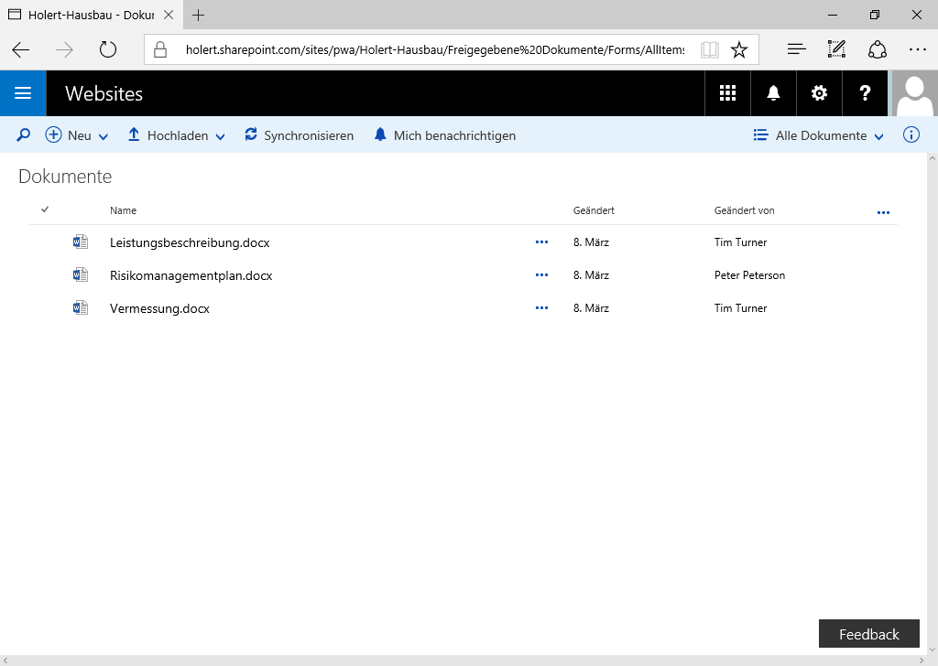
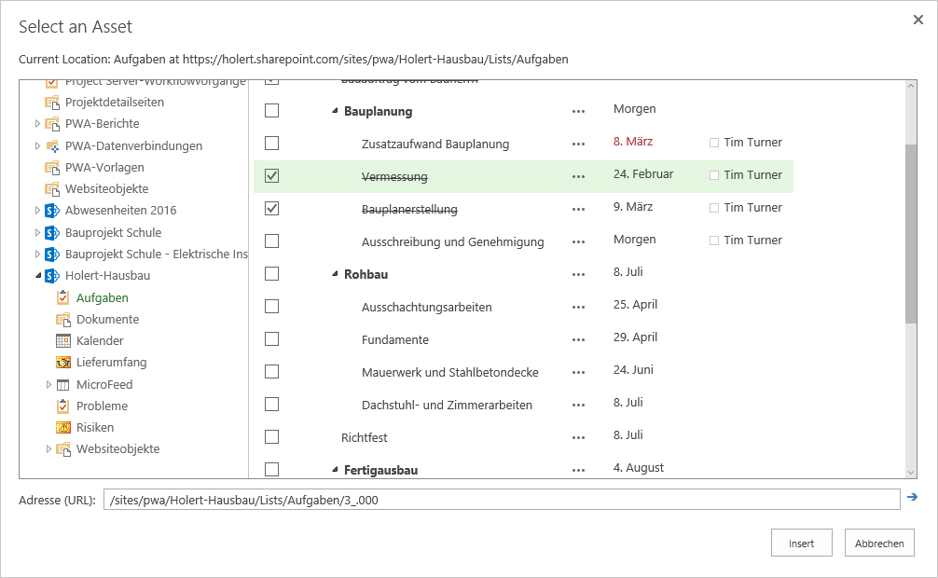
Project Server SE requires SharePoint Server Subscription Edition and is provided as an additional service for SharePoint, just as SharePoint Server does with its services such as Excel Services, Search Services, etc. This means that Project Server is installed into an existing SharePoint Server farm and then integrates seamlessly. Besides using the same infrastructure, the integration also means that a SharePoint site is created for each project. Among other things, this allows documents related to project tasks to be stored and open items and risks to be managed.
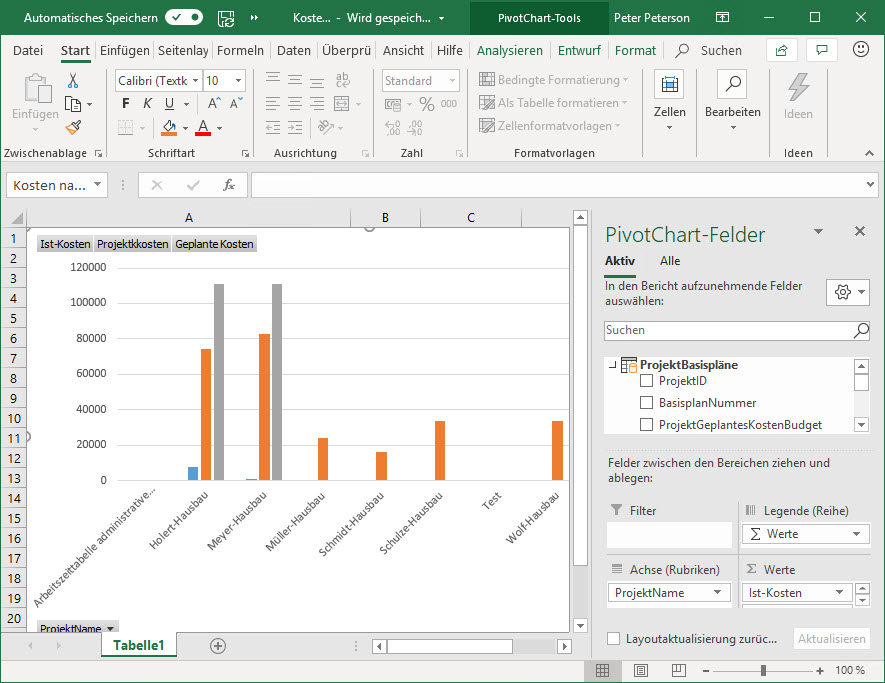
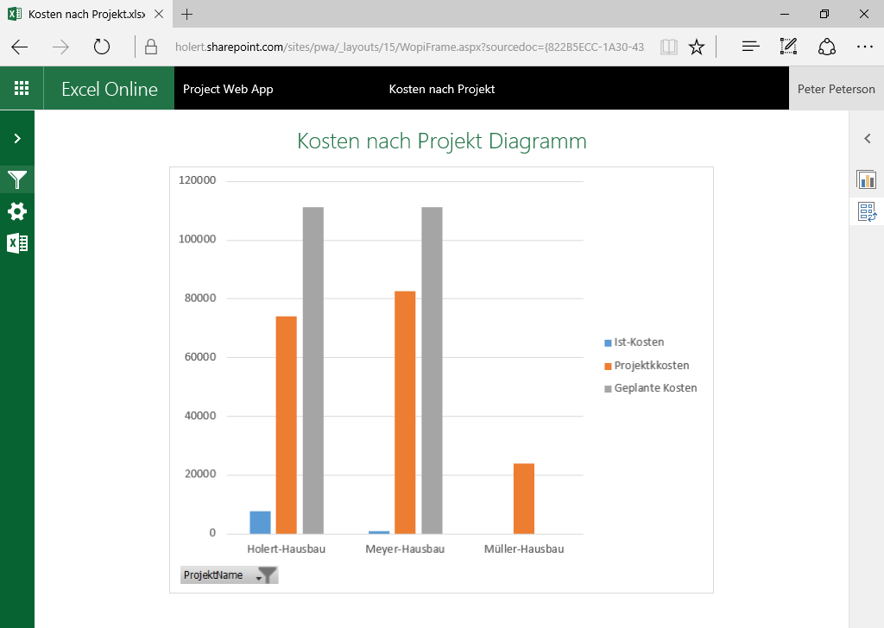
For reporting, Project Server relies on SQL Server Analysis Services, so cross-project and cross-resource analyses with Excel PivotCharts and PivotTables are easy (see figure above). In addition, Power BI can be used as a reporting tool on top of the reporting database.
As with Project Standard, Project Server features a large number of programming interfaces that make it easier for third-party vendors to create solutions, e.g. for integration with other IT systems. Examples include integration with other applications, such as integration with SAP as well as Exchange and Outlook.
Microsoft Project Server – in detail
Project leads - project managers
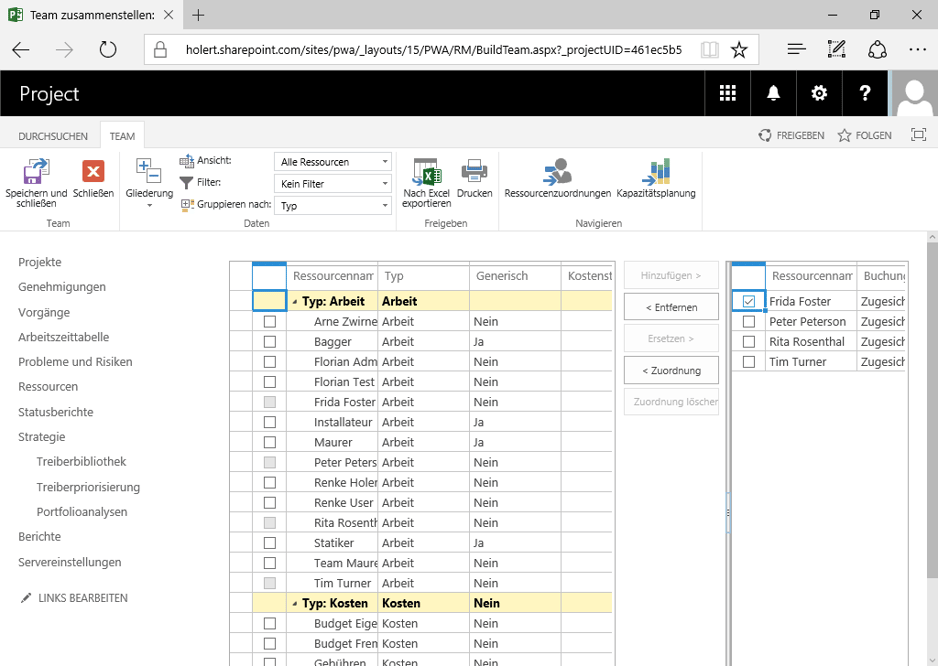
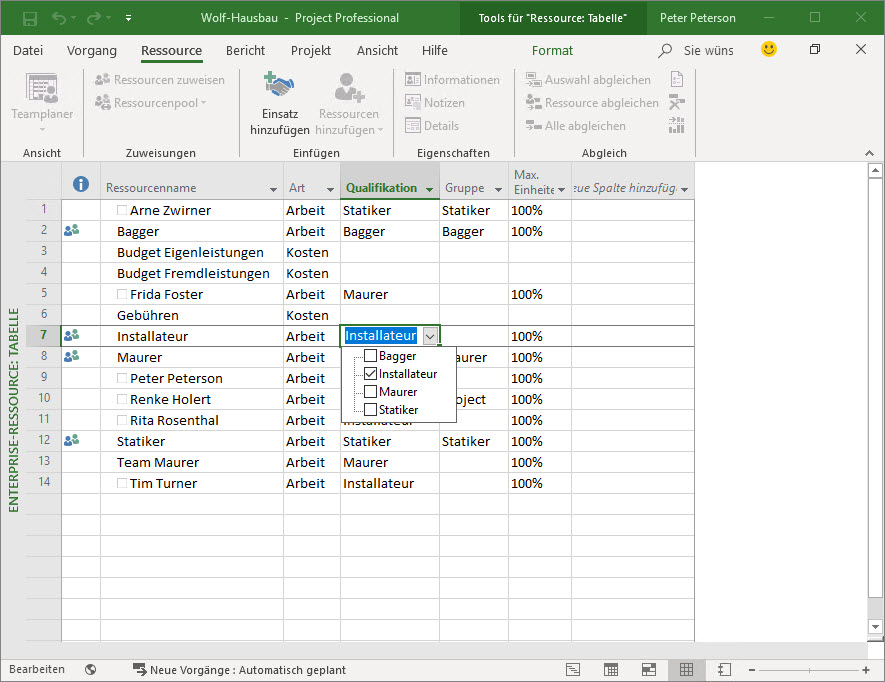
Because resources are stored centrally in Project Server, the project manager can assemble the project team from this resource pool. In doing so, the project manager can see, for example, the qualifications of the resources and their availability. Availability results from the total working time minus absences, non-project time, and time already scheduled in other projects.
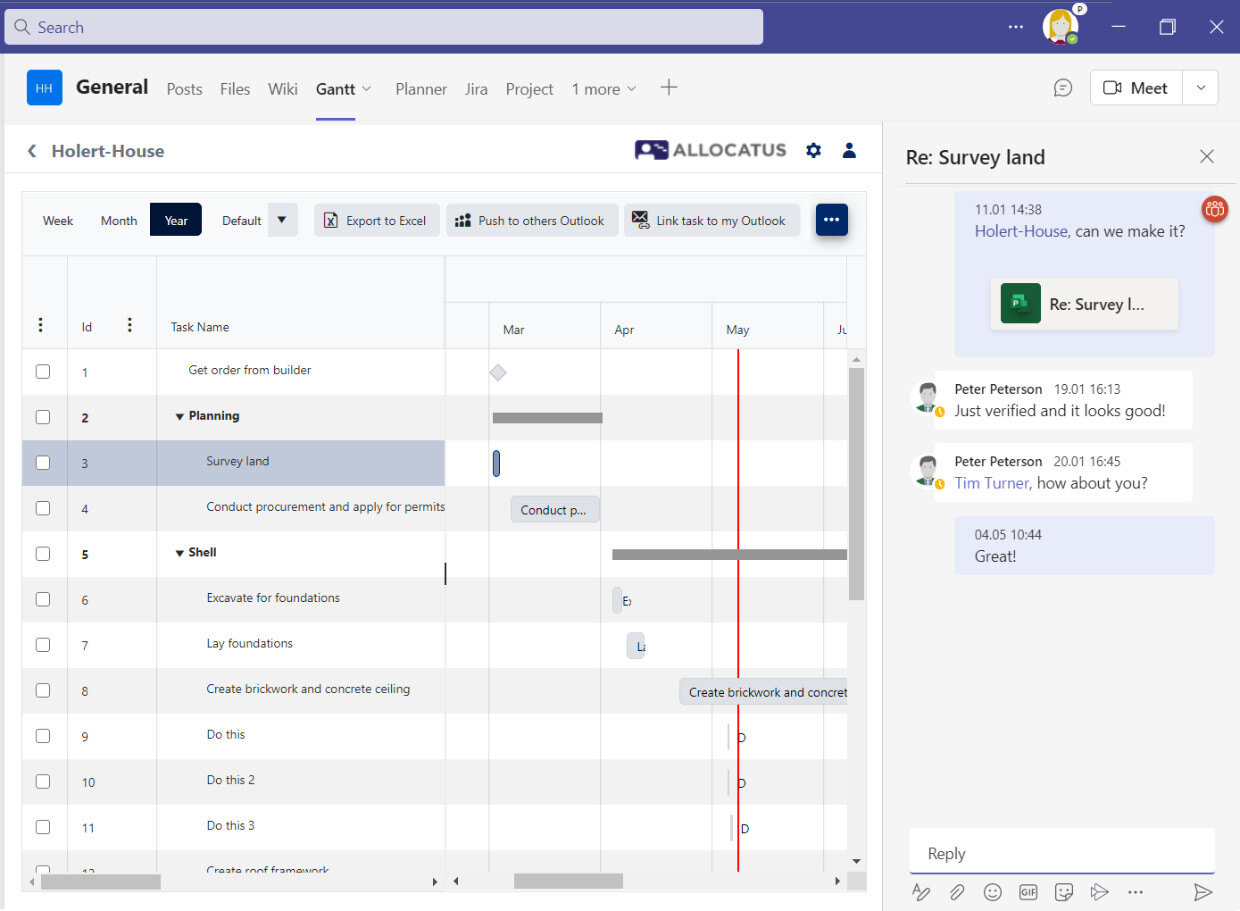
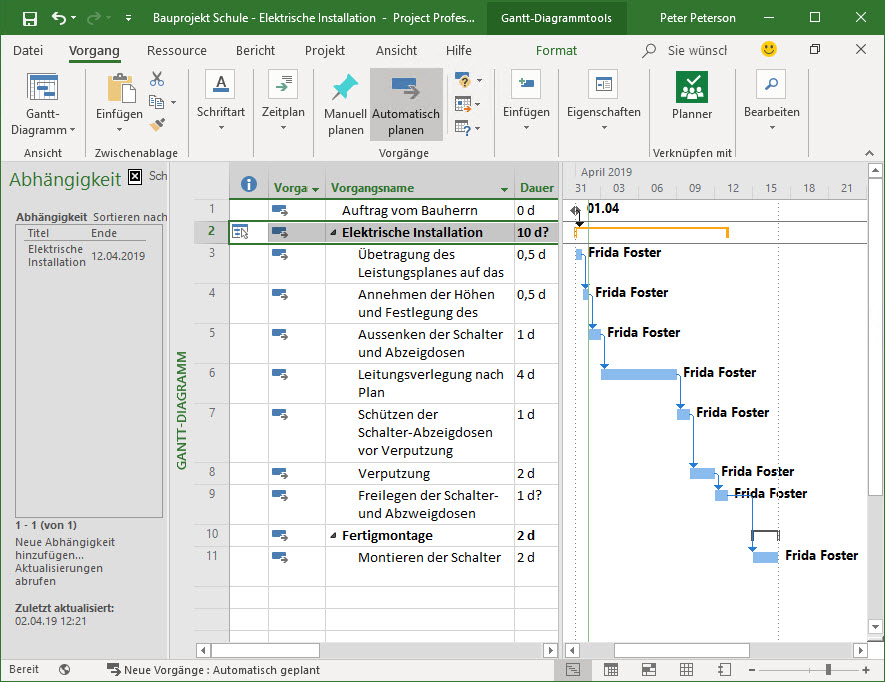
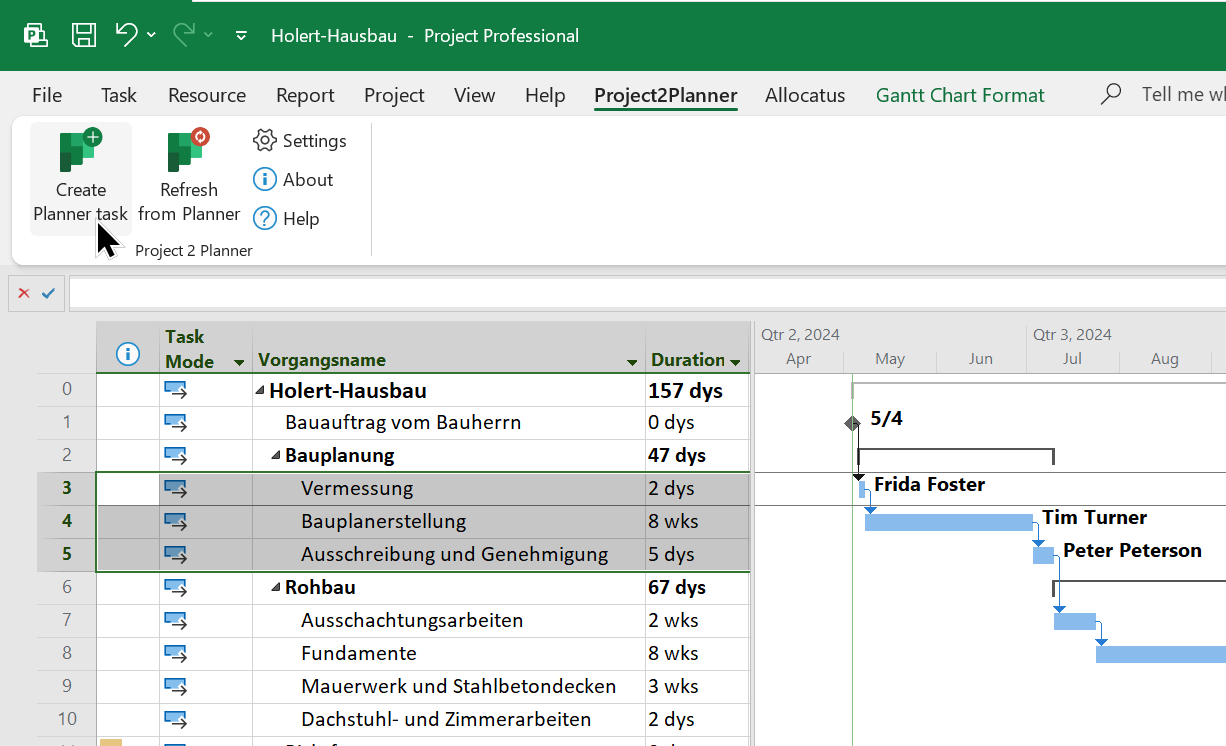
If the project manager's project requires deliverables from other projects and/or produces deliverables for other projects, these dependencies can be stored in the respective project plans. This way, deviations can be identified quickly. The software only draws attention to the deviations but does not make any changes on its own (soft link). Shown is the standard feature for deliverables and dependencies. It is even easier with TS/SA.
The project manager can attach one or more documents to each task, e.g. to document the results of a task. This way, all project stakeholders can easily access a central location (project workspace) in SharePoint or Microsoft Teams, which also handles versioning automatically.
In Chapter 1 of our book (available in German), we describe in detail how to lead your project as a project manager in accordance with the PMI PMBOK Guide.
Project staff - team members
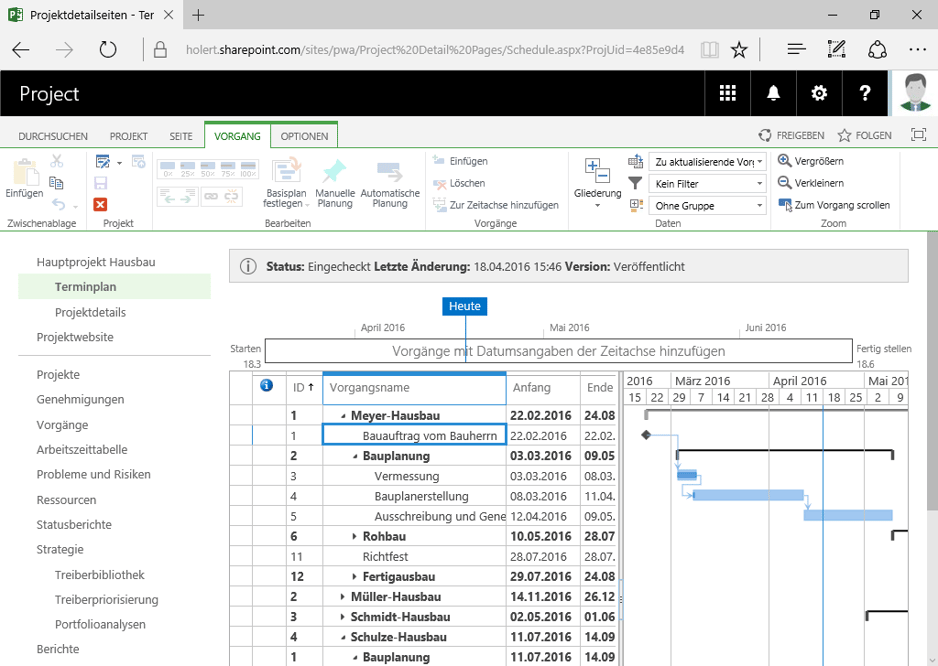
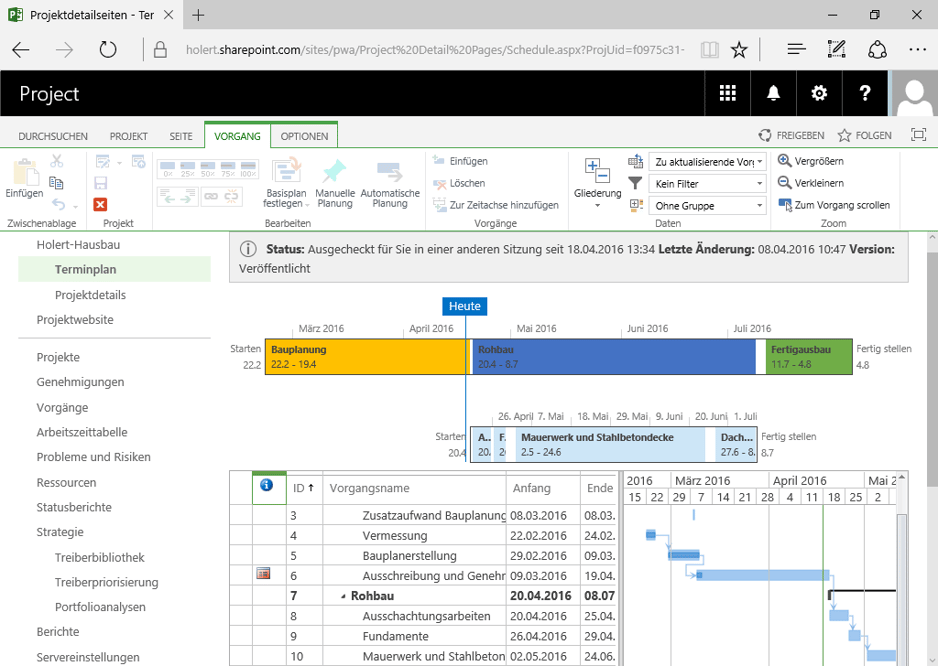
Without needing a version of Project, team members get access to the current project plan via the Project Web App. The figure below also shows, in the indicator column, the reference to a linked document. According to their permissions, team members see, for example, the dates but not the costs.
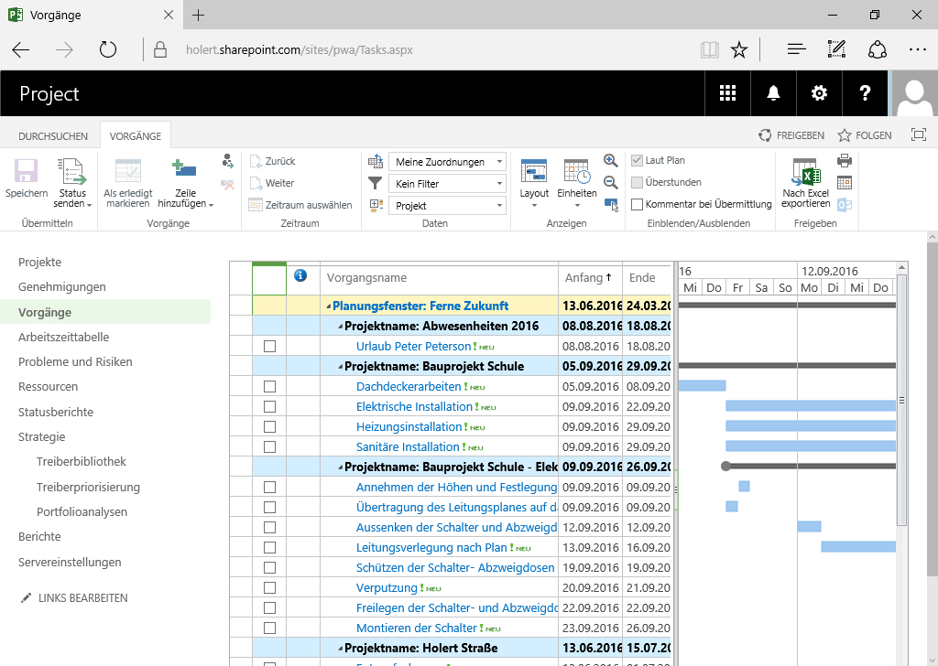
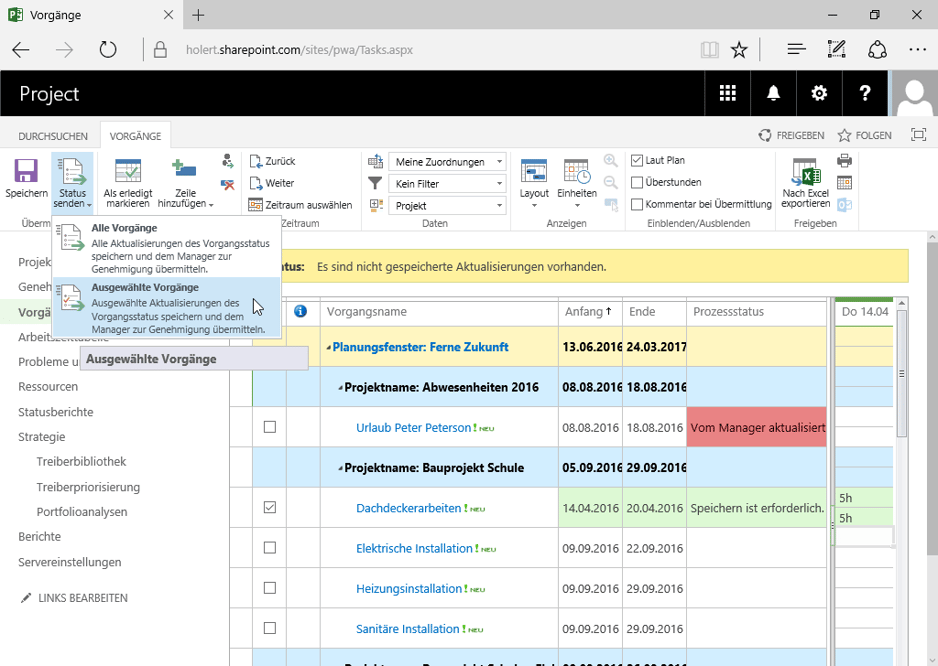
In addition to the project plan, team members also get a personalized view (work backlog/task card) showing all current tasks from all projects they are working on (see figure below). Through this view, team members can also report current progress, which the project manager can transfer into the project plan in an automated or semi-automated way. Project Server then automatically recalculates any linked tasks according to the logical structure of the project plan and, where applicable after manual intervention by the project manager, updates the project status reports.
In addition to the progress reporting directed at the project manager, the Microsoft Project Web App also includes effort/time tracking – essentially a timesheet – which can be sent, for example, to the resource manager. The resource manager can then approve it and forward it, e.g. as a basis for invoice verification, to accounting.
In Chapter 2 of our book, we describe how to work with the Project Web App from the team member's perspective.
Even more easily, and without an additional Project license, employees can report their project time with Allocatus via Microsoft Outlook.
Resource managers - department heads, team leads, group leads
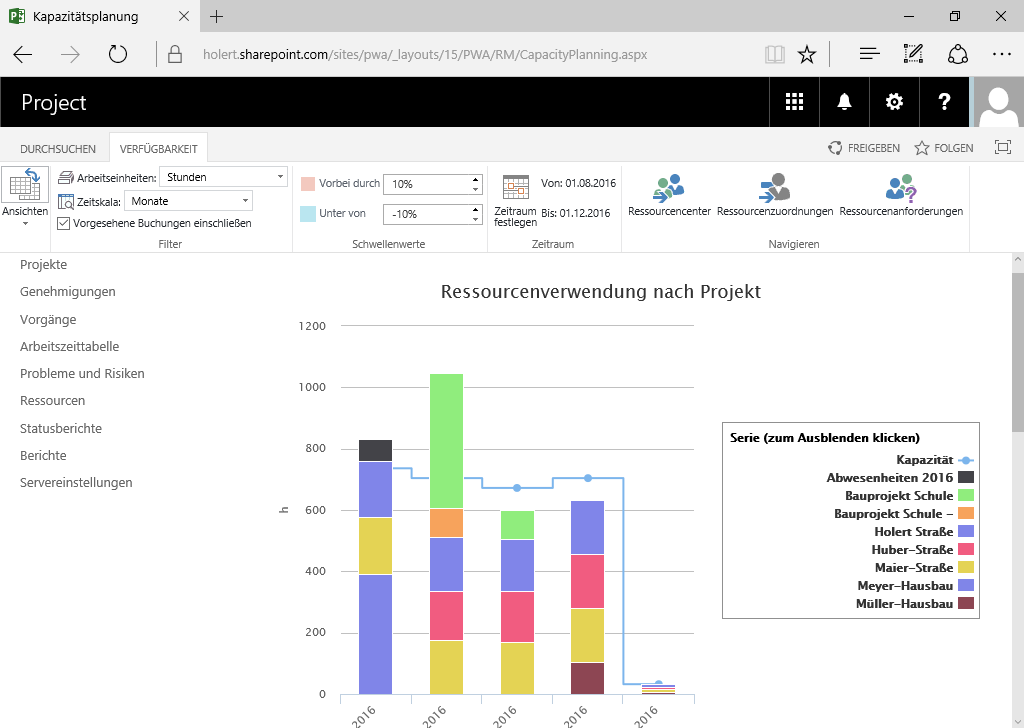
Through central reports, the resource manager can always determine how the resources are utilized (staffing plan). This creates the basis for reacting quickly to changes, e.g. replanning due to delays in project work or absence due to illness, new projects, etc. The resource manager can thus proactively approach project managers to recommend replanning and, if necessary, actively adjust the resource pool.
If the qualifications of the resources are stored in the Microsoft Project Web App, it also supports the resource manager in analyzing the resource pool in order to identify suitable available and qualified resources, even across locations. Resource demand can thus easily be compared with resource supply and aligned, e.g. through training and recruiting measures.
In Chapter 3 of our book, we describe how to implement resource management with Microsoft Project.
Executives - management, project offices, project steering offices
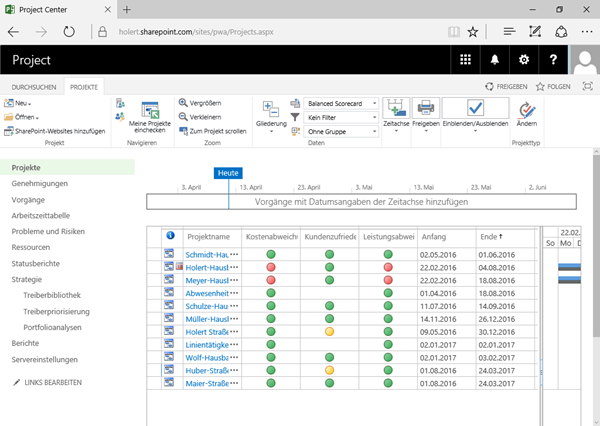
For project controlling, executives need an overview beyond the boundaries of a single project. In the Project Web App, they find a summarized view of all projects, e.g. grouped by programs or portfolios. Multi-project management is simplified by integrated procedures for variance analysis. For example, traffic-light indicators can visualize deviations in schedule and costs graphically (see figure at the beginning of the article). At any time, the executive can then drill down to display the corresponding project plan in order to analyze any deviations in more depth. In Chapter 4 of our book, we describe how to implement the PMI portfolio management processes with the Microsoft Project Web App.
Numeric and graphical reports can easily be customized to individual needs, and the values can be aggregated in any way. For example, resource utilization, the deviation of planned and actual effort, cumulative total costs across all projects, effort across all projects and resources, or only parts thereof can be calculated. These analyses can also be scoped by area or period, e.g. a quarter of a fiscal year.
Especially for executives, the portfolio management features can further standardize and simplify the selection and steering of projects in alignment with corporate goals.
How to create project and project portfolio reports yourself with Microsoft Excel and Microsoft Power BI and analyze them with Excel for the web and the Power BI app is described in Chapter 5 of our book.
Support status: Project Server 2016 and 2019 out of support since 14 July 2026
On 14 July 2026, extended support ended for Project Server 2016 and Project Server 2019 – at the same time as SharePoint Server 2016 and 2019, on which these versions run (see Microsoft's Ending Support in 2026 overview). Since then, these versions receive no security updates, no other fixes, and no support. Anyone still running one of them in production is operating on an unpatched platform – which, for a server application that typically holds enterprise-wide schedule, resource, and cost data, is a material security and compliance issue.
This makes Project Server Subscription Edition the only remaining supported on-premises option. It follows the Modern Lifecycle Policy, so it has no fixed end-of-support date – but in return the farm must be kept continuously up to date.
What this means for migration planning
- Project Server SE is installed exclusively as a service of the Enterprise edition of SharePoint Server SE; it cannot be enabled with a Standard license (software requirements).
- Supported platforms are Windows Server 2019, 2022, and 2025, together with SQL Server 2019 CU5 or later and SQL Server 2022 (database compatibility level 150). The Cube Building Service additionally requires Analysis Services.
- Supported clients are Project Professional 2019, 2021, and 2024, as well as the Project Online Desktop Client.
- There is no in-place upgrade: you build a new SE farm and then attach and upgrade the databases from Project Server 2016 or 2019 using PowerShell (upgrade guide). There is no direct path from Project Server 2013.
If you have to migrate anyway, use the occasion to review the target architecture fundamentally: together with the withdrawal of Project Online, the question is whether a self-operated SharePoint farm remains the right foundation for enterprise-wide project and portfolio management in the long run – or whether a cloud solution is the better fit.
 Renke Holert

 Renke Holert : Sep 1, 2025, 11:15:00 AM